Asset registries in Postgres/PostGIS, inspection logs in SQL Server, meter data in MySQL, tracking sheets in Google Sheets — point VoltGrid at them and every table with a geometry column, or even plain lat/long columns, is auto-discovered and served three ways: dynamic MVT vector tiles, OGC API Features, and an ESRI FeatureServer. No ETL, no migration project, no per-vendor drivers.
A single in-process DuckDB engine ATTACHes each source read-only via its scanner/attach extension — postgres_scanner, mysql_scanner, the bundled sqlite, plus community mssql, bigquery, and gsheets. No per-vendor ADO.NET driver to ship.
GEOMETRY/WKB columns, BLOB columns recognized by st_geometrytype, and common names (geom/geometry/the_geom).POINT view via ST_Point(lon, lat, 4326) from lat/long pairs (flagged isLatLongVirtualized).# connect and discover spatial tables curl -X POST http://localhost:5059/api/connectors \ -H 'Content-Type: application/json' \ -d '{ "name":"prod-pg", "kind":"Postgres", "connectionString": "host=localhost port=5432 dbname=gis user=postgres password=secret" }' → profile saved, DPAPI-encrypted → collections discovered & served
Each discovered collection is exposed under /api/spatial/{dbId}/... — so ArcGIS Pro, QGIS, MapLibre, and any OGC client across the utility can consume your existing tables with no extra wiring.
/collections/{c}/tiles/{z}/{x}/{y}.mvt — fast PBF vector tiles generated on demand via DuckDB ST_AsMVT.
/collections/{c}/items?bbox=&limit=&filter= — modern RESTful GeoJSON with filtering and sorting.
/FeatureServer/{i}/query?where=&geometry= — drop it straight into an ArcGIS map.
Connection strings encrypted with Windows DataProtectionScope.CurrentUser to connectors.json; decrypted only in memory at connect time.
Sources are ATTACHed read-only — your authoritative systems of record are never written to from the desktop. VoltGrid gives them a live map view, and pairs with GRID State for the operational record itself.
Community extensions fail gracefully (profile saved, lastError shown); only bundled official extensions are guaranteed offline — a fit for isolated OT networks.
| Group | Endpoint | Notes |
|---|---|---|
| Management | GET / POST /api/connectors | List / register a source profile |
| Management | POST /api/connectors/test | Validate before saving |
| Management | GET /api/connectors/{id}/collections | Discovered spatial collections |
| Spatial facade | GET /api/spatial/{dbId}/collections/{c}/items | OGC API Features (bbox, filter, sortby) |
| Spatial facade | GET /api/spatial/{dbId}/collections/{c}/tiles/{z}/{x}/{y}.mvt | Dynamic vector tiles |
| Spatial facade | GET /api/spatial/{dbId}/FeatureServer/{i}/query | ESRI FeatureServer query |
Base URL http://localhost:5059. Browser smoke test at /connectors-test.html. Npgsql is not used — by design the app relies on DuckDB's scanner extensions, not per-vendor ADO.NET.
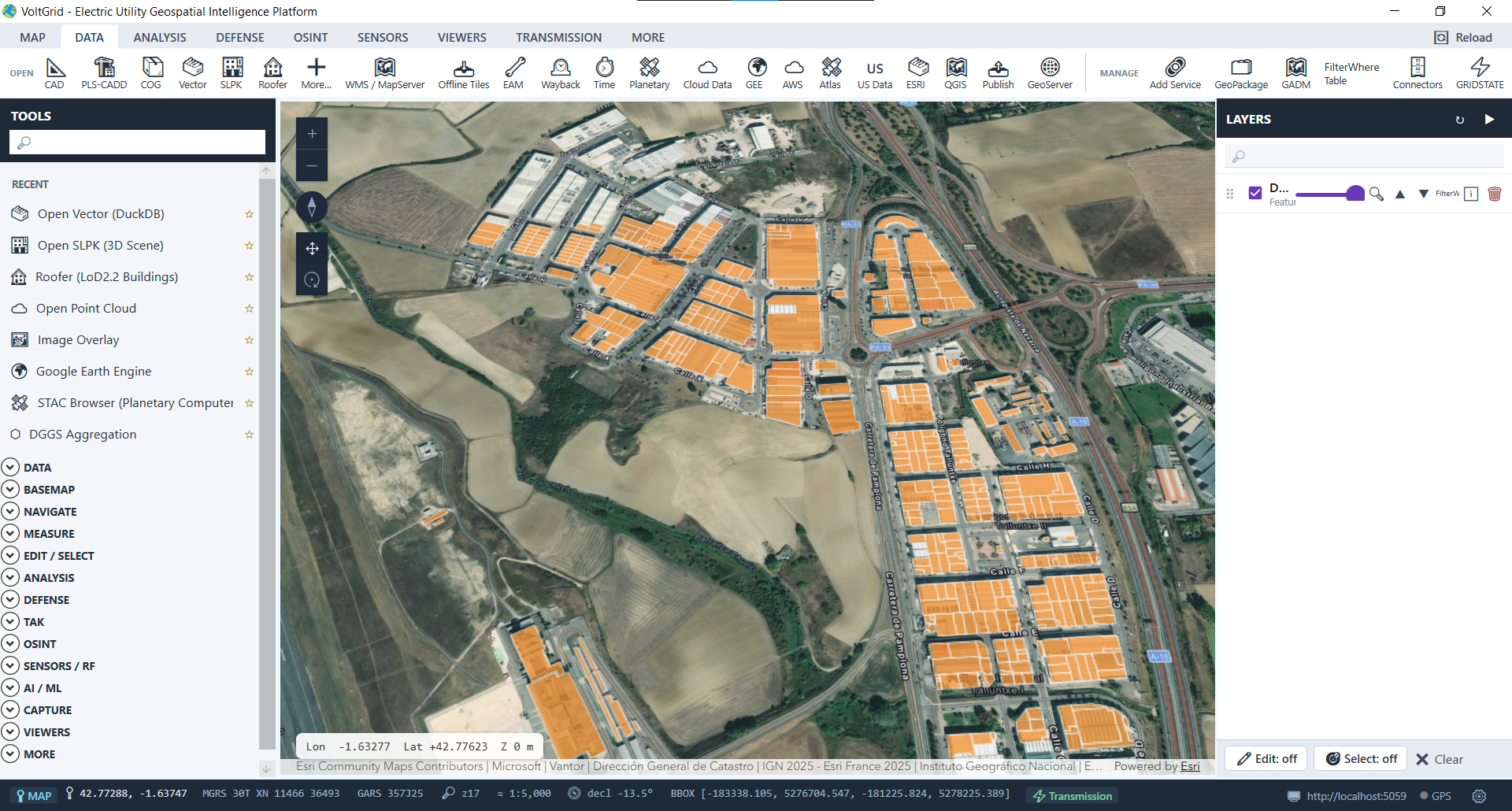
Auto-discover, query, and style regional vector polygons and parcels in-process with hardware-accelerated symbology.
For utilities standardizing on Microsoft Fabric, VoltGrid reads Delta tables straight from OneLake — no extract, no sync, no Power BI export. Drop in your Lakehouse URI + account key and every .delta table you name is registered as a DuckDB view over delta_scan('abfss://...'), served through the same MVT / OGC API Features / FeatureServer facades as every other connector.
azure (auth) + delta (reader) + spatial extensions. No community-extension dependency, no version-locked binary.<dataDir>/fabric/profiles.json, encrypted with Windows DataProtectionScope.CurrentUser. Never written to disk in cleartext.tableFilter (e.g. ["assets","outages","meters"]); VoltGrid composes abfss://<workspace>@<account>.dfs.fabric.microsoft.com/<lakehouse>.Lakehouse/Tables/<table> per table and registers a view. No bucket-listing surface.SELECT, so VoltGrid can never mutate your lakehouse. Pair with GRID State for the operational write layer.POST /api/connectors/test.// OneLake Delta tables → DuckDB views { "name": "fabric-prod", "kind": "FabricLakehouse", "connectionString": { "oneLakeUri": "abfss://util-workspace@onelake.dfs.fabric.microsoft.com/Assets.Lakehouse", "accountName": "utilstorage", "tableFilter": ["poles","conductors","outages"] }, "accountKey": "..." } → profile saved, DPAPI-encrypted → per-table views registered via delta_scan() → served at /api/spatial/fabric-prod/…
Microsoft Fabric OneLake connectivity directly queries Delta Parquet tables over secure Azure Storage endpoints.
Seven sources — six databases plus Microsoft Fabric OneLake — auto-discovered spatial tables, three serving facades — without moving a single row out of the systems your utility trusts.
